Texts normally land instantly. So when a message shows no “Delivered” and no response, it feels like it vanished into thin air. You hit send, and instead of confirmation, you get silence — leaving you unsure whether the customer ever saw it.
Here’s the thing: texts fail for all kinds of reasons. Sometimes it’s your customer’s device. Sometimes it’s your carrier. And sometimes the issue sits on your side of the fence. Understanding the real cause saves you time and keeps conversations from breaking down. If you need a quick overview of the common reasons texts fail to send, we’ve covered that too.
Why would a message not show “Delivered”?
If your message doesn’t show as delivered, it means it left your system but never reached the recipient’s phone. Common reasons include:
- Their device is off or out of coverage
- The number is inactive or incorrectly entered
- The carrier is throttling or blocking the message
- You’ve been blocked
- There’s a routing or network issue along the way
And because SMS doesn’t offer the same live feedback loops as apps like WhatsApp or Messenger, a text can vanish quietly. No double-checks, no blue ticks — just ambiguity.
That’s exactly why business texting can feel tricky. Modern A2P (application-to-person) messaging runs through layers of carriers, filters, registries, and compliance rules. Most of that happens behind the scenes, and when something breaks, you only see the final error.
This guide breaks down the most common causes behind failed delivery and how to fix them before they impact customers.
14 Common Reasons Business Texts Don’t Deliver
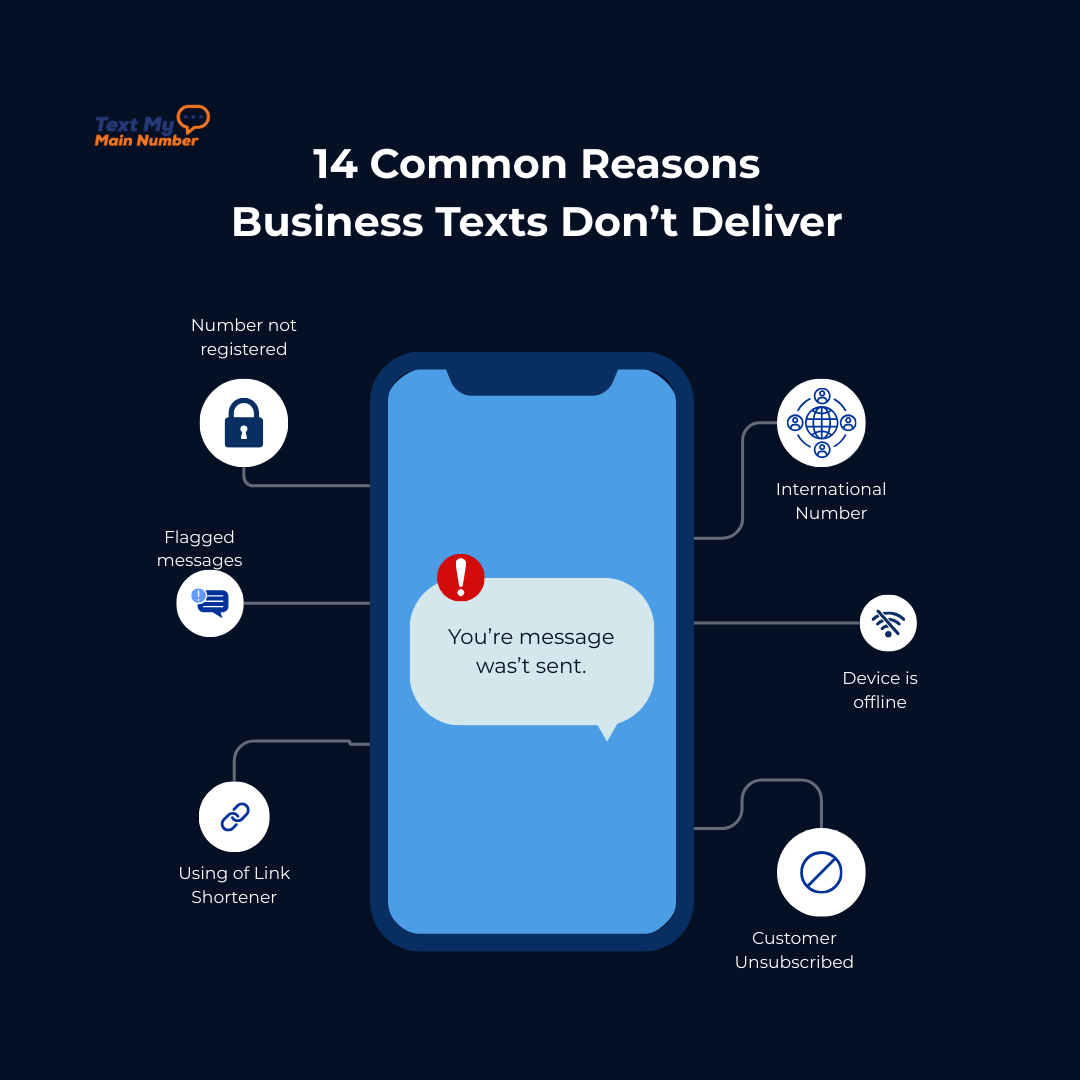
Business texts fail for patterns that show up again and again. The most frequent include:
1. Your business texting number isn’t properly registered
Carriers no longer treat business texting the same way they treat personal texting. To reduce spam and keep consumers protected, they require every business to verify who they are and what they plan to send. Learn how the 10DLC registration process works and what carriers expect. This is the backbone of the 10DLC system.
If your 10-digit number wasn’t submitted to The Campaign Registry — or your toll-free number wasn’t verified — carriers don’t trust your traffic. And when they don’t trust it, they throttle it, filter it, or block it outright. The message never leaves their system, and you never get a clear explanation.
The tricky part is that registration isn’t just a formality. It validates your business details, your messaging use case, and your opt-in method. If any part of that doesn’t meet carrier standards, your messages get flagged before they even enter the pipeline.
You can see how carrier verification works directly through The Campaign Registry.
2. Mobile carriers flagged your message content
Carrier filtering is far more aggressive than most people realize. Every major network runs automated systems that scan message content in real time. The moment something looks unsafe, unprofessional, or similar to a known spam pattern, the message is stopped.
A few things immediately raise red flags:
- Messages that fall under the SHAFT categories (sex, hate, alcohol, firearms, tobacco)
- Topics carriers mark as high-risk, like cannabis, fast-money schemes, or questionable financial services
- Messages with sloppy grammar or obvious typos that resemble bot-generated spam
- Links that look untrustworthy or mask their destination
These guidelines follow the industry standards outlined in the CTIA Messaging Principles.
And here’s what most businesses don’t know: carriers never tell you which rule you triggered. You only see a vague “carrier violation” or “blocked” notice, leaving you guessing which part of the message caused the issue.
3. You used a link shortener
Shortened links look convenient for marketing. To carriers, they look like a trap.
Scammers and phishing campaigns rely heavily on shorteners like bit.ly because they hide the final destination. Carriers treat these links as high-risk by default. Even if your message is legitimate, the presence of a shortened URL can be enough to stop delivery.
Some carriers will drop the message quietly. Others will filter it before it even leaves your provider. Either way, the result is the same: the customer never sees it.
4. The customer unsubscribed from your messaging
When someone replies STOP, UNSUBSCRIBE, CANCEL, END, or HELP, it triggers an automatic opt-out. The system instantly marks them as unreachable, and all future messages to that number are rejected.
There’s no warning and no grace period. Once the contact opts out, delivery is blocked at the carrier level. These rules come directly from SMS compliance requirements businesses must follow. Even important updates won’t go through.
For businesses that rely on long-term communication — real estate agents, healthcare practices, service providers — this is a silent but common reason messages fail. You think the message didn’t deliver because of a technical glitch, but in reality, you’re legally not allowed to text that person anymore.
5. You’re sending too many messages
Carriers watch message frequency closely. When the volume spikes — or when one contact receives multiple one-way messages without responding — the traffic starts to look suspicious.
Patterns that raise concern include:
- Repetitive messages sent within minutes
- High-volume campaigns with identical content
- Multiple outbound messages to the same person with no previous engagement
- Large “bursts” of messages that look like automation rather than conversation
To the carrier, these signals resemble spam behavior. When that happens, they slow or block the messages to protect consumers, even if your content is legitimate and your intentions are good.
6. Issues with a contact’s phone number
Sometimes the problem has nothing to do with your system or your content — the number itself is the bottleneck.
Delivery fails when:
- The phone number is inactive or no longer in service
- You mistyped a digit (a small error that causes a hard block)
- The number format is incorrect for the country you’re texting
- You’re unknowingly texting a landline that cannot receive SMS
Here’s a deeper look at texting landlines and why they don’t receive standard SMS.
You might send multiple messages, thinking the issue is on your end, but the carrier is quietly discarding every attempt because the number isn’t capable of receiving texts.
7. You’re trying to reach an international customer
Once your message crosses a border, it enters a completely different rulebook. Every country has its own regulations, carrier relationships, and message restrictions — and they change often.
Some examples:
- Canada blocks 10DLC traffic entirely and only accepts toll-free messages
- Certain countries only allow promotional messages on business days
- Others require a pre-approved sender ID before any message can be delivered
- Some carriers automatically filter English-language links
- Some regions restrict SMS volumes by hour or time zone
A message that delivers instantly in the U.S. might be rejected instantly overseas, with no clue as to why.
8. Your customer’s phone settings are blocking the message
Modern smartphones give users a surprising amount of control over what reaches their inbox. Filters for unknown senders, privacy modes, and business-message suppression can all stop your text from ever appearing on their screen. iPhones, for example, can automatically separate messages from businesses or unknown numbers into a hidden folder without notifying the user. Certain Android devices allow similar filtering, spam protection, or “silent delivery” settings that bury messages entirely.
To you, it looks like a failed delivery. To the customer, the message simply never shows up — even though their number is technically active.
On iPhones, this can happen automatically because of Apple’s Filter Unknown Senders setting.
9. The device is offline or between networks
Texts rely on a stable cellular connection. When a customer is traveling, has poor service, switches SIMs, powers off the device, or leaves their phone in Airplane Mode longer than expected, the text sits in limbo. It doesn’t fail — it just waits. If the reconnection takes too long, some carriers will eventually drop the message instead of delivering it later.
This kind of delivery failure is common with international travel, prepaid carriers, and rural coverage gaps. It’s unpredictable, and businesses usually see it as a random hiccup.
10. Carrier or provider outages
Sometimes the problem is bigger than your message. Carriers push updates, throttle high-traffic routes, or experience temporary hardware failures — none of which show up on your dashboard. Your SMS provider may also have routing delays, overloaded queues, or maintenance windows that quietly interrupt traffic.
From your perspective, the message “should have been delivered.” But somewhere in the chain between your platform and the customer’s device, a system was down or congested. You can confirm outages by checking real-time carrier outage reports.”
11. The recipient’s inbox or SIM storage is full
Not all customers use modern messaging apps. Some rely on older devices or prepaid SIM cards with strict storage limits. When the inbox reaches capacity, new messages are rejected without warning. Newer phones rarely hit this limit, but older Androids, feature phones, or low-cost carriers still enforce storage caps behind the scenes.
The message isn’t filtered or blocked — it simply has nowhere to go.
12. Your message exceeded length or encoding limits
SMS has strict technical rules. Once your message passes 160 characters, it’s split into segments. In most cases, those segments reassemble cleanly — but certain symbols, emojis, or special characters force the message into UCS-2 encoding, shrinking the segment size dramatically. When that happens, some carriers mishandle the reconstruction, causing partial delivery, scrambled characters, or complete failure.
It’s a quiet technical failure that most businesses never think to check.
13. The customer’s number was recently ported
When a customer switches carriers, their number enters a transition period called “porting.” During that window — sometimes minutes, sometimes hours — messages can bounce between the old and new network. The text may be delivered late, go to the wrong carrier, or disappear entirely. It’s not a spam issue or a content issue; it’s simply a routing mismatch while databases update.
Businesses often mistake this for a platform problem, but it’s just the number moving from one network to another.
14. The message type isn’t supported on the recipient’s device
Not all devices or regions support the same formats. Some phones can’t display MMS. Others can’t render certain emojis, GIFs, or attachments. Even something simple like a high-resolution image can cause the carrier to drop the message or strip it down before delivery. If the device can’t interpret the format, the message hits a dead end.
This is especially common with older devices, international numbers, and certain prepaid carriers with limited MMS support.
14 Proven Fixes to Improve Your Text Message Delivery

Before you can get consistent results with business texting, you need to understand how to correct the issues that silently block or filter your messages. If message failures are causing gaps with customers, here’s how to prevent lost customer messages. These fixes address the most common delivery problems and help your texts reach customers reliably.
1. Fix: Register your business texting number properly
If you’re using a local 10-digit number, complete your 10DLC registration with accurate business details, use case, sample messages, and opt-in proof. If you’re using a toll-free number, submit it for verification. Once your number is approved, carriers trust your traffic and stop throttling or filtering your messages. A verified number almost always improves deliverability overnight.
2. Fix: Clean up message content so it passes carrier filters
Stay away from restricted topics, avoid risky keywords, and write messages that look intentional — not automated. Use clear grammar, clear links, and straightforward language. Even simple things like removing excessive punctuation or rewriting a confusing line can get you past carrier filters. If your content looks professional and predictable, carriers let it through.
3. Fix: Stop using generic link shorteners
Replace bit.ly, tinyurl, and other generic shorteners with either:
- your full URL, or
- a branded domain you control
Carriers trust recognizable domains. When they can see where a link goes, they don’t treat the message as a potential phishing attempt. This single change solves a huge percentage of blocked messages.
4. Fix: Get customers re-opted in the right way
If someone unsubscribed — even accidentally — you can only reach them after they opt back in. The cleanest way is for the customer to text START or YES to your number. Anything else won’t reactivate them. Make the opt-in process visible on your website, intake forms, booking pages, and support flows so customers can easily reconnect.
5. Fix: Manage frequency and avoid repetitive blasts
Spread out your messaging, especially for contacts who haven’t replied yet. Rotate your message templates, segment your lists, and avoid hitting the same person with multiple one-way messages in a single day. Carriers reward conversational messaging — meaning back-and-forth exchanges — so build your flows with that in mind.
6. Fix: Clean your contact list regularly
Remove inactive numbers, landlines, duplicates, and anything formatted incorrectly. Use a platform that flags invalid or unreachable numbers so you’re not repeatedly sending to dead data. A clean list means fewer carrier errors, fewer bounces, and higher delivery rates across the board.
7. Fix: Follow international texting rules for each country
Before sending texts outside the U.S., check the rules for the specific region. Some countries require toll-free numbers, some require sender IDs, some restrict promotional hours, and some block certain content entirely. Aligning your number type and message timing with local regulations dramatically improves your success rate.
8. Fix: Check carrier and SMS platform status pages
If delivery suddenly drops for multiple contacts, it’s often an outage. Carriers and SMS platforms publish real-time status updates, so check those dashboards before troubleshooting anything else. If the outage is on their side, messages typically resume once systems stabilize.
9. Fix: Shorten overly long messages or simplify formatting
If your message is too long or contains special characters that trigger UCS-2 encoding, rewrite it. Use plain text, remove unnecessary emojis, and keep the message concise. Splitting complex information into two clear messages also helps carriers deliver it consistently.
10. Fix: Use device-friendly message formats
If you're sending MMS, high-resolution images, GIFs, or unsupported file types, simplify the format. Use standard images, supported emojis, and clean text. For important messages, default to plain SMS to avoid compatibility issues with older devices or international carriers.
Meet Text My Main Number — the platform built for reliable SMS delivery
When your texts don’t deliver, the problem rarely sits in one place. It’s usually a mix of carrier rules, customer settings, and small technical details most businesses never see. Once you understand what’s happening behind the scenes — and how to fix it — your messaging becomes more reliable, more predictable, and far more valuable to your customers. If you want a platform that handles compliance, registration, routing, and deliverability for you, Text My Main Number makes that part effortless. You focus on the conversation; we handle the mechanics.
If you’re ready to see how smooth business texting can be, start your 14-day free trial.

.svg)