
Buy Template
Tips and Tutorials

SMS Contact Groups: How to Organize Business Text Contacts

Build useful text contact groups with clear rules for who joins, who leaves, and who keeps each list current. Learn how to check permission, prepare imports, and choose recipients before sending.

SMS Contact Groups: How to Organize Business Text Contacts

Say you run a self-storage facility and need to tell Building B tenants about a scheduled keypad replacement. Your contacts also include former tenants, people renting in other buildings, and people who only asked about availability. Sending to a list called “Customers” would reach people who have no reason to receive that notice.

SMS contact groups organize contacts into saved recipient lists. The useful question is who belongs on each list today—and what change should take them off it.

We recommend deciding that before importing contacts or writing the announcement. Every group needs a reason to add someone, a reason to remove them, and a person responsible for keeping it current.

Build SMS Contact Groups Around a Specific Message

Start with the messages your business actually sends. At the storage facility, building-specific maintenance notices need a different recipient list from promotional availability alerts.

“Building B — Active Tenants” tells a teammate what the group is for. “Customers” leaves them guessing.

A contact group is a saved collection of contacts. The audience is the people you select for a particular message. The saved group gives you a starting list, but the announcement still needs its own recipient decision.

Everyone renting in Building B might need a keypad-replacement notice. If the work affects only one entrance, though, check which tenants use it before including the whole building. You may need a smaller audience for this notice without creating another permanent group.

Organizing recipients also differs from putting customers into a shared group conversation. Before sending, check whether your chosen method exposes recipients’ numbers or sends replies to everyone. A saved list alone tells you neither.

Our rule is simple: if you cannot name a useful message the proposed group would receive, wait before creating it.

Write Down Who Joins, Who Leaves, and Who Updates the Group

Make the Entry Rule Specific

For the storage example, “has rented from us” is too broad. A useful entry rule is “has an active rental that includes a Building B unit.”

That points to something the office can check: the current rental roster. It also keeps old inquiries and completed rentals from slipping into an active-tenant group.

Use the business record that establishes the relationship. If an old contact spreadsheet disagrees with the rental roster, resolve the difference before adding the person.

Tie Removal to a Business Event

A tenant transferring out of Building B may no longer need its maintenance notices. Someone moving out entirely should leave the active-tenant group.

But check all their rentals before removing them. A tenant moving a unit to Building C might still rent another unit in Building B. The exit rule should be “no active Building B rental remains,” rather than “a transfer happened.”

Removing someone from a working group need not mean deleting their contact record. You may still need their conversation history or have another reason to keep their details.

Keeping the contact and keeping them on an announcement list are separate decisions.

Update Membership When the Business Record Changes

Give each group a named maintainer and a backup. Have them update membership when a rental starts, transfers, or ends, rather than waiting until an announcement is ready.

If you have multiple employees texting from one business number, write the membership rules somewhere everyone covering the number can find them. The backup should be able to make the same decision as the regular maintainer.

Keep the group’s purpose, entry rule, exit rule, maintainer, and source record together. A clear name helps, but it cannot carry every instruction.
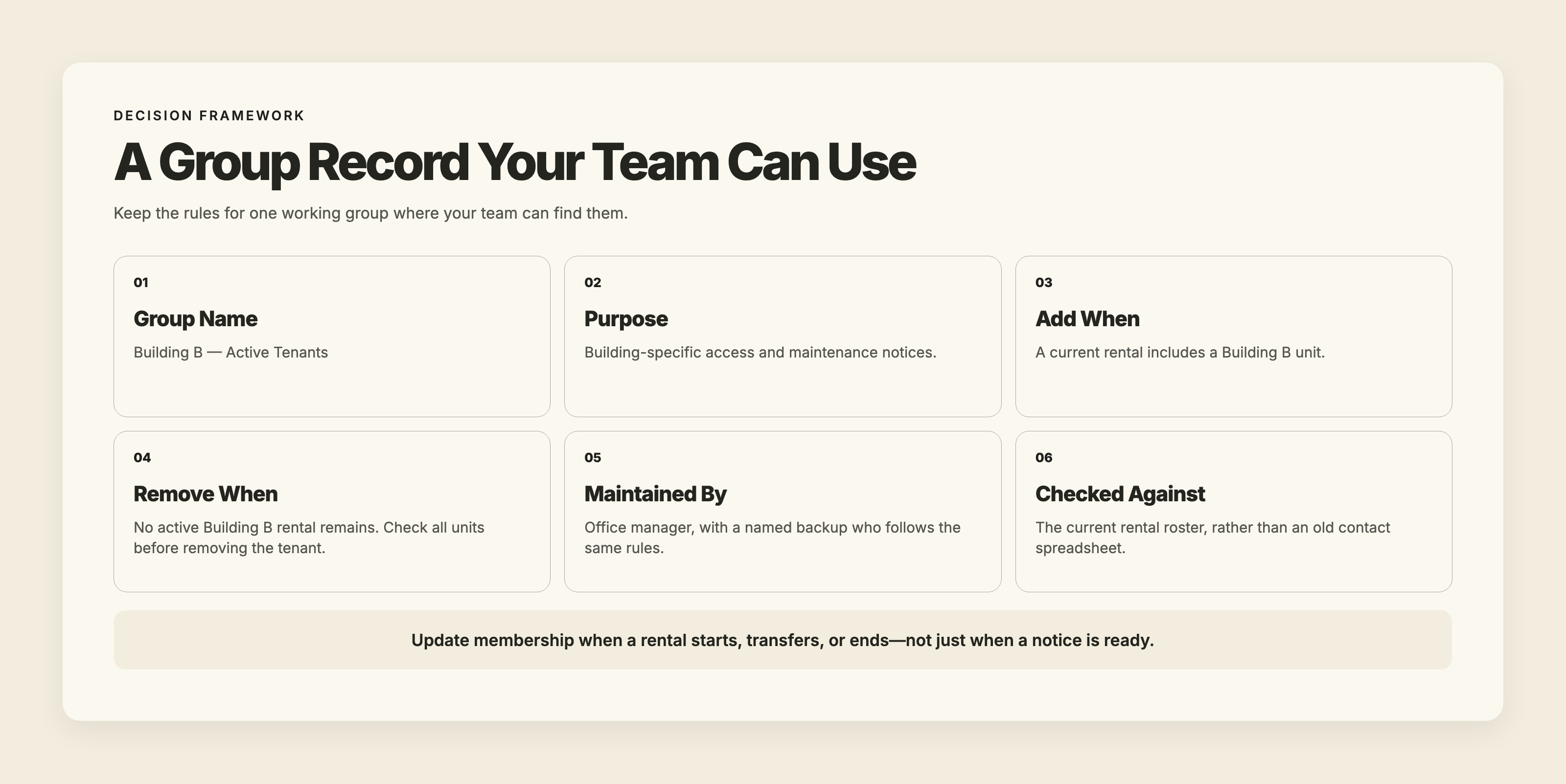
Example group record for Building B active tenants: purpose, entry and exit rules, office-manager ownership, and the current rental roster used to check membership.

Keep Message Permission Separate From Customer Status

An active rental explains why someone might need a building notice. It does not tell you everything they agreed to receive by text.

A tenant might want access updates without wanting promotional availability alerts. Someone who asked about a vacant unit might have requested an availability notification without ever becoming a tenant.

In the US, subject to applicable exemptions, the FCC’s current TCPA rule requires prior express written consent for telemarketing texts sent using an automatic telephone dialing system, and prior express consent—which can be oral—for nonmarketing texts sent using that technology. In February 2026, the Fifth Circuit ruled that the statute requires prior express consent without a separate written-consent standard for telemarketing communications covered by those provisions, so the applicable consent analysis can depend on jurisdiction. Have a lawyer confirm what applies to your messages.

Keep permission evidence in a maintained spreadsheet or business record. Record the message purposes covered, when and how the person agreed, and where the supporting evidence is stored. Include any applicable review or expiry date, along with withdrawal requests and the action taken.

A group named “Text Subscribers” cannot replace that evidence.

CTIA’s voluntary Messaging Principles and Best Practices recommend explaining the type and purpose of messages during opt-in, tying permission to the intended campaign and sender, and retaining opt-in and opt-out records. This is industry guidance, not a substitute for applicable law.

For Canadian businesses, CRTC guidance says commercial electronic messages generally require consent, sender identification, and an unsubscribe mechanism. Its compliance guidance also explains that implied consent can expire and that senders should be able to prove the consent they rely on.

An “existing customer” label should never become permanent permission for every kind of text.

Stop requests need human attention, too. A customer may write “please stop texting me” rather than use a standard keyword. Act on those requests and record the change.

Customer status identifies the relationship and relevance of a notice. Text permission records agreed message purposes and changes such as withdrawals or expiry.

Prepare the Contact List Before Importing It

A spreadsheet can have perfectly formatted phone numbers and still contain the wrong people. Once you have selected the contacts for your group, check the details you are about to import.

A tenant might appear twice after a transfer: once against the old Building B unit and once against the new Building C unit. Keeping one copy of their number fixes the duplicate, but you still need to check whether they belong in the Building B group at all.

Look closely at repeated numbers under different names, too. A couple may share one phone. Find out what those entries represent before deciding which to keep. Check outdated contact details as well; the right tenant name does not prove the saved number is still right.

Keep permission evidence available during that review. If the export contains names and numbers but leaves you unable to explain which texts those people agreed to receive, return to the underlying records.

Overlapping groups deserve attention as well. A tenant with rentals in several buildings may appear on several lists. Before sending the same facility-wide notice separately to those groups, review the overlap so the same person does not receive repeated copies. Do not assume the sending tool will remove duplicates across separate sends.

Choose the Audience Again Before You Send

Return to the keypad replacement. The saved Building B group may have been correct when it was prepared. A transfer or move-out since then can change who belongs.

Read the announcement against the current recipients. Everyone selected should still need the information, and the permission you hold should fit the planned text. Review stop requests before using the list again.

Keep account-specific details in individual conversations. A common maintenance notice should not carry a particular tenant’s balance, unit-access problem, or private arrangement.

Once the audience is settled, customer notification templates can help you write the announcement clearly. Select recipients before adapting the wording; a polished message still creates confusion when sent to someone it does not concern.

Also decide who will handle questions. A keypad notice may prompt a tenant to ask whether their existing code will work or whether they need to change a planned visit. Planning for two-way business texting means making room for those replies. Put someone familiar with the work in charge of answering them.
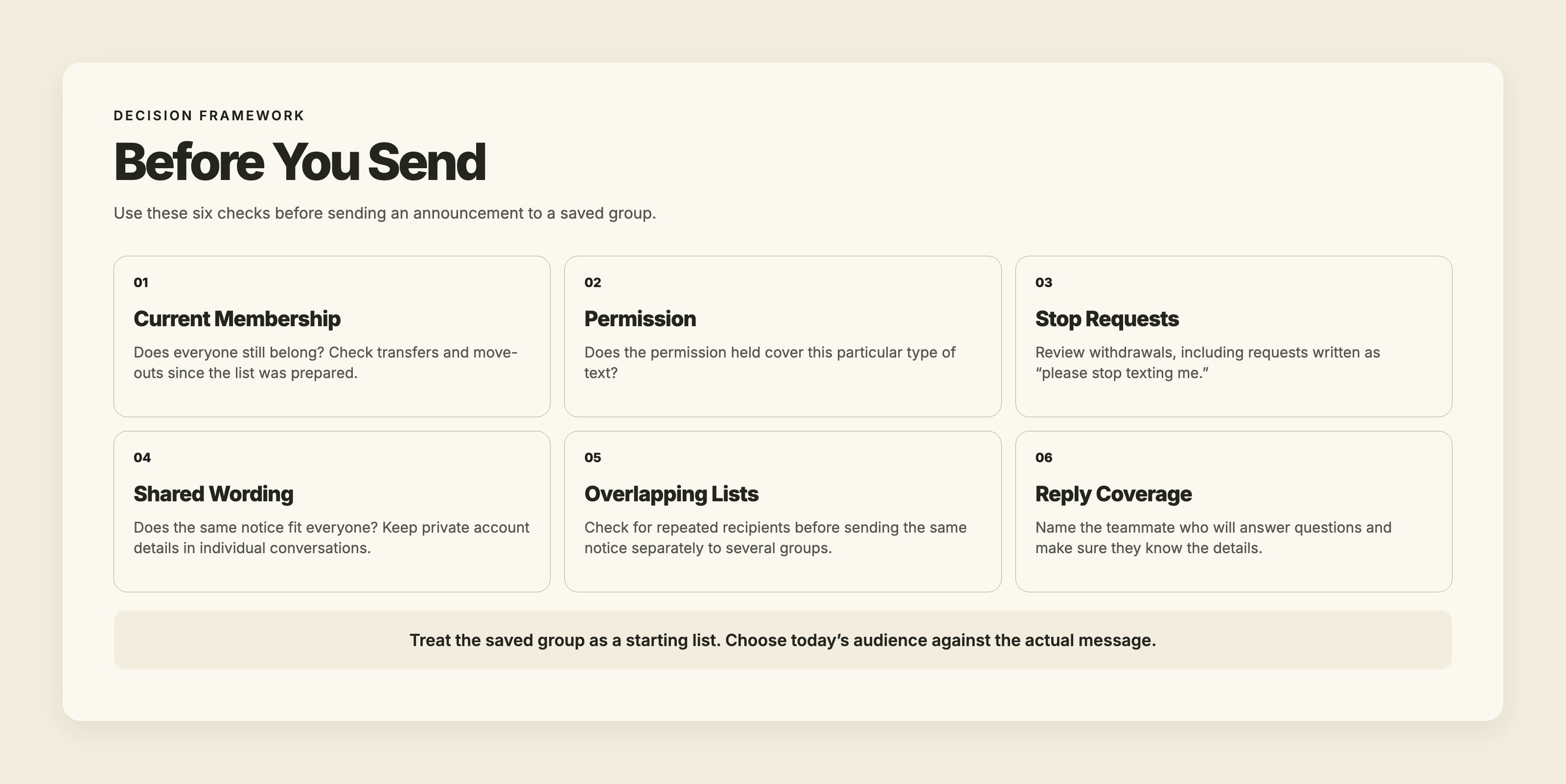
Before sending a group text, check current membership, permission, stop requests, shared wording, overlapping recipient lists, and who will answer replies.

Set Up Your First Contact Group

Start with one recurring purpose, such as Building B maintenance notices, rather than importing your entire contact database.

  1. Export the current roster from the rental software, CRM, or other business record you trust.
  2. Clean the file: remove former tenants and duplicate entries, check shared numbers and transfers, and take out anyone without permission for this message type.
  3. Import the prepared XLS, XLSX, CSV, or TXT file directly into a new TMMN group.
  4. Give the group a purpose-specific name, such as “Building B — Active Tenants,” and add custom labels if they help your team.
  5. Write the group’s add/remove rule and the maintainer’s name somewhere the team can find them.
  6. Before the first send, review the actual recipients, have the teammate responsible for replies ready, then send the message to the group.

Import and Organize Contact Groups in TMMN

With TMMN, you can add texting to an existing landline or VoIP business number.

Alongside contact imports and group messaging, TMMN supports custom labels for organizing contacts. You can also export a group as vCard or Excel.

The number of groups and contacts allowed per group depends on your plan. Work out which lists serve a recurring purpose before choosing a plan around the number of groups you expect to keep.

TMMN also handles recognized opt-out keywords. When a contact texts STOP, SMS OFF, NOSMS, SMSOFF, or NO SMS, TMMN adds that number to its opt-out list. Later sends to that number fail with the reason “SMS OFF.” Continue reviewing ordinary-language stop requests alongside that keyword handling.

Add “update text groups” to one existing transfer, cancellation, or move-out process. That puts contact maintenance next to the event that makes the old membership wrong. A person can remain in your contact records long after they stop belonging in a particular recipient group.

Try organizing one clearly defined group with your business number during TMMN’s 14-day free trial.

Ready To Strengthen Your Customer Connections?

Start your free 14-day trial and experience the impact of efficient business texting on your customer engagement.

 ·
November 5, 2026

SMS Contact Groups: How to Organize Business Text Contacts

Build useful text contact groups with clear rules for who joins, who leaves, and who keeps each list current. Learn how to check permission, prepare imports, and choose recipients before sending.

Three stacked cardboard boxes labeled “Active Tenants,” “Availability Alerts,” and “Former Tenants,” beneath the headline “Every Contact in Its Place,” illustrating organized SMS contact groups.

Say you run a self-storage facility and need to tell Building B tenants about a scheduled keypad replacement. Your contacts also include former tenants, people renting in other buildings, and people who only asked about availability. Sending to a list called “Customers” would reach people who have no reason to receive that notice.

SMS contact groups organize contacts into saved recipient lists. The useful question is who belongs on each list today—and what change should take them off it.

We recommend deciding that before importing contacts or writing the announcement. Every group needs a reason to add someone, a reason to remove them, and a person responsible for keeping it current.

Build SMS Contact Groups Around a Specific Message

Start with the messages your business actually sends. At the storage facility, building-specific maintenance notices need a different recipient list from promotional availability alerts.

“Building B — Active Tenants” tells a teammate what the group is for. “Customers” leaves them guessing.

A contact group is a saved collection of contacts. The audience is the people you select for a particular message. The saved group gives you a starting list, but the announcement still needs its own recipient decision.

Everyone renting in Building B might need a keypad-replacement notice. If the work affects only one entrance, though, check which tenants use it before including the whole building. You may need a smaller audience for this notice without creating another permanent group.

Organizing recipients also differs from putting customers into a shared group conversation. Before sending, check whether your chosen method exposes recipients’ numbers or sends replies to everyone. A saved list alone tells you neither.

Our rule is simple: if you cannot name a useful message the proposed group would receive, wait before creating it.

Write Down Who Joins, Who Leaves, and Who Updates the Group

Make the Entry Rule Specific

For the storage example, “has rented from us” is too broad. A useful entry rule is “has an active rental that includes a Building B unit.”

That points to something the office can check: the current rental roster. It also keeps old inquiries and completed rentals from slipping into an active-tenant group.

Use the business record that establishes the relationship. If an old contact spreadsheet disagrees with the rental roster, resolve the difference before adding the person.

Tie Removal to a Business Event

A tenant transferring out of Building B may no longer need its maintenance notices. Someone moving out entirely should leave the active-tenant group.

But check all their rentals before removing them. A tenant moving a unit to Building C might still rent another unit in Building B. The exit rule should be “no active Building B rental remains,” rather than “a transfer happened.”

Removing someone from a working group need not mean deleting their contact record. You may still need their conversation history or have another reason to keep their details.

Keeping the contact and keeping them on an announcement list are separate decisions.

Update Membership When the Business Record Changes

Give each group a named maintainer and a backup. Have them update membership when a rental starts, transfers, or ends, rather than waiting until an announcement is ready.

If you have multiple employees texting from one business number, write the membership rules somewhere everyone covering the number can find them. The backup should be able to make the same decision as the regular maintainer.

Keep the group’s purpose, entry rule, exit rule, maintainer, and source record together. A clear name helps, but it cannot carry every instruction.

Example group record for Building B active tenants: purpose, entry and exit rules, office-manager ownership, and the current rental roster used to check membership.

Keep Message Permission Separate From Customer Status

An active rental explains why someone might need a building notice. It does not tell you everything they agreed to receive by text.

A tenant might want access updates without wanting promotional availability alerts. Someone who asked about a vacant unit might have requested an availability notification without ever becoming a tenant.

In the US, subject to applicable exemptions, the FCC’s current TCPA rule requires prior express written consent for telemarketing texts sent using an automatic telephone dialing system, and prior express consent—which can be oral—for nonmarketing texts sent using that technology. In February 2026, the Fifth Circuit ruled that the statute requires prior express consent without a separate written-consent standard for telemarketing communications covered by those provisions, so the applicable consent analysis can depend on jurisdiction. Have a lawyer confirm what applies to your messages.

Keep permission evidence in a maintained spreadsheet or business record. Record the message purposes covered, when and how the person agreed, and where the supporting evidence is stored. Include any applicable review or expiry date, along with withdrawal requests and the action taken.

A group named “Text Subscribers” cannot replace that evidence.

CTIA’s voluntary Messaging Principles and Best Practices recommend explaining the type and purpose of messages during opt-in, tying permission to the intended campaign and sender, and retaining opt-in and opt-out records. This is industry guidance, not a substitute for applicable law.

For Canadian businesses, CRTC guidance says commercial electronic messages generally require consent, sender identification, and an unsubscribe mechanism. Its compliance guidance also explains that implied consent can expire and that senders should be able to prove the consent they rely on.

An “existing customer” label should never become permanent permission for every kind of text.

Stop requests need human attention, too. A customer may write “please stop texting me” rather than use a standard keyword. Act on those requests and record the change.

Customer status identifies the relationship and relevance of a notice. Text permission records agreed message purposes and changes such as withdrawals or expiry.

Prepare the Contact List Before Importing It

A spreadsheet can have perfectly formatted phone numbers and still contain the wrong people. Once you have selected the contacts for your group, check the details you are about to import.

A tenant might appear twice after a transfer: once against the old Building B unit and once against the new Building C unit. Keeping one copy of their number fixes the duplicate, but you still need to check whether they belong in the Building B group at all.

Look closely at repeated numbers under different names, too. A couple may share one phone. Find out what those entries represent before deciding which to keep. Check outdated contact details as well; the right tenant name does not prove the saved number is still right.

Keep permission evidence available during that review. If the export contains names and numbers but leaves you unable to explain which texts those people agreed to receive, return to the underlying records.

Overlapping groups deserve attention as well. A tenant with rentals in several buildings may appear on several lists. Before sending the same facility-wide notice separately to those groups, review the overlap so the same person does not receive repeated copies. Do not assume the sending tool will remove duplicates across separate sends.

Choose the Audience Again Before You Send

Return to the keypad replacement. The saved Building B group may have been correct when it was prepared. A transfer or move-out since then can change who belongs.

Read the announcement against the current recipients. Everyone selected should still need the information, and the permission you hold should fit the planned text. Review stop requests before using the list again.

Keep account-specific details in individual conversations. A common maintenance notice should not carry a particular tenant’s balance, unit-access problem, or private arrangement.

Once the audience is settled, customer notification templates can help you write the announcement clearly. Select recipients before adapting the wording; a polished message still creates confusion when sent to someone it does not concern.

Also decide who will handle questions. A keypad notice may prompt a tenant to ask whether their existing code will work or whether they need to change a planned visit. Planning for two-way business texting means making room for those replies. Put someone familiar with the work in charge of answering them.

Before sending a group text, check current membership, permission, stop requests, shared wording, overlapping recipient lists, and who will answer replies.

Set Up Your First Contact Group

Start with one recurring purpose, such as Building B maintenance notices, rather than importing your entire contact database.

  1. Export the current roster from the rental software, CRM, or other business record you trust.
  2. Clean the file: remove former tenants and duplicate entries, check shared numbers and transfers, and take out anyone without permission for this message type.
  3. Import the prepared XLS, XLSX, CSV, or TXT file directly into a new TMMN group.
  4. Give the group a purpose-specific name, such as “Building B — Active Tenants,” and add custom labels if they help your team.
  5. Write the group’s add/remove rule and the maintainer’s name somewhere the team can find them.
  6. Before the first send, review the actual recipients, have the teammate responsible for replies ready, then send the message to the group.

Import and Organize Contact Groups in TMMN

With TMMN, you can add texting to an existing landline or VoIP business number.

Alongside contact imports and group messaging, TMMN supports custom labels for organizing contacts. You can also export a group as vCard or Excel.

The number of groups and contacts allowed per group depends on your plan. Work out which lists serve a recurring purpose before choosing a plan around the number of groups you expect to keep.

TMMN also handles recognized opt-out keywords. When a contact texts STOP, SMS OFF, NOSMS, SMSOFF, or NO SMS, TMMN adds that number to its opt-out list. Later sends to that number fail with the reason “SMS OFF.” Continue reviewing ordinary-language stop requests alongside that keyword handling.

Add “update text groups” to one existing transfer, cancellation, or move-out process. That puts contact maintenance next to the event that makes the old membership wrong. A person can remain in your contact records long after they stop belonging in a particular recipient group.

Try organizing one clearly defined group with your business number during TMMN’s 14-day free trial.

This article first appeared on Text My Main Number.

Keep reading.

All articles

Ready to talk it through?

When you’re ready to compare options, we’ll help you work out what fits.

Talk with us
Or call 1-800-797-3167