The Buzzword That Actually Solves a Real Problem
“Unified Communications” sounds like the kind of jargon you’d hear in a boardroom at a Fortune 500 company. For most small business owners, it either means nothing—or worse, it sounds like something bloated, expensive, and irrelevant.
But here’s the reality: unified communications is not just a big-business concept. In fact, it might be more valuable to small teams than anyone else.
If you’ve ever juggled customer texts, missed phone calls, and emails spread across multiple inboxes—while also trying to keep track of who replied to what—you’ve already felt the problem. Unified communications is the solution.
And in 2026, with customer expectations higher than ever and team capacity tighter than ever, clarity and coordination across channels isn’t a luxury. It’s a competitive edge.
Let’s break down what unified communications actually means, why it matters, and what small businesses really need from it.
What Unified Communications Really Means (Without the Jargon)
At its core, unified communications (UC) simply means bringing all your essential customer communication—voice, text, email, chat—into one system, so your team can handle conversations without switching apps or losing context.
That’s it.
It’s not about adding more tools. It’s about replacing six disjointed ones with one system that does the job better.
Most small businesses already use a mix of tools: a cell phone number for texting, a desk phone or VoIP system for calls, Gmail for customer emails, and maybe a chat tool or booking app thrown in. But none of those tools talk to each other. That fragmentation is a major reason small teams get overwhelmed, and How Small Teams Manage Customer Conversations Without Burnout (2026 Guide) breaks down what happens when communication lives in too many places, which means:
- Messages get missed
- Customers fall through the cracks
- No one on the team has the full picture
- And every handoff comes with friction
Unified communications solves that by centralizing everything—so your team can see and manage customer interactions from a single place, with full history and accountability.
It’s not just about convenience. It’s about creating a better customer experience while making your team’s job easier.
And no—it’s not just for enterprise. It’s not complicated. And it’s not out of reach. The key is choosing a platform built for small businesses, with simplicity and practicality at the center.
Core Features of a Unified Communications System

What should actually be included—and why it matters for small teams.
Unified communications isn’t just about bundling a bunch of tools together. It’s about connecting them in a way that reflects how your team actually works—and how your customers actually reach out.
For small businesses, that means cutting through the clutter and focusing on the features that directly reduce confusion, improve speed, and help you deliver a more consistent customer experience.
Here are the core components that define a practical, small-business-ready unified communications (UC) system:
Business Text Messaging (SMS)
Texting is no longer optional. If you want to use texting strategically rather than casually, 10 Proven Ways to Boost SMS Customer Engagement for Your Business offers practical methods to improve response rates and customer loyalty. It’s how customers confirm appointments, ask questions, and expect quick updates—especially on mobile.
A UC system should include integrated SMS so your team can send and receive texts through your business number (not personal phones). Even better if it’s searchable, tied to customer history, and visible to your entire team—not just the person who replied.
Use Cases:
- Appointment confirmations and reminders
- Order updates and delivery notifications
- Customer support or follow-up messages
VoIP Calling and Voicemail (with Caller ID Control)
Voice is still critical—especially for high-touch, urgent, or complex conversations. But traditional phone systems are clunky, disconnected, and expensive.
VoIP (Voice over Internet Protocol) lets your team make and receive calls from anywhere—mobile, desktop, or web—while still using your business number. Voicemail should be easy to check, tied to customer records, and ideally transcribed so nothing gets missed.
Key Benefits:
- Make and receive business calls on any device
- Route calls by time, team, or priority
- Present one business number (even if you have multiple staff)
Shared Team Inbox
A shared inbox is the foundation of clarity. It means every incoming message—whether text or voicemail—lands in one central view, accessible by the whole team.
It prevents the classic questions like:
- “Did anyone reply to this?”
- “Where’s the last message from this customer?”
- “Who was handling this?”
The shared inbox should allow for assignments, tags, status updates, and easy message routing, so nothing slips through and everyone knows who’s responsible for what.
Full Conversation History Across Channels
Customers don’t think in channels—they think in conversations. This mindset shift is also explored in Why Modern Customer Communication Isn’t One Channel Anymore (2026 Guide), which explains why disconnected tools now hurt customer experience. If they text you today, email tomorrow, and call next week, they expect you to remember who they are and what was said.
A true UC system keeps a single thread of history tied to each customer, regardless of how they reach out. That history should be instantly visible to your team, so any member can jump in without making the customer repeat themselves.
This not only saves time—it builds trust.
Internal Notes, Mentions, and Collaboration Tools
Communication isn’t just external. Your team needs to talk to each other, too.
A solid UC system allows for internal notes on conversations (e.g., “Customer requested a call back after 4 PM”) or @mentions to quickly loop in the right teammate. That internal layer of communication keeps everyone aligned without clogging up the customer thread.
Mobile and Desktop Access
Whether you're running a retail floor, managing field service techs, or juggling admin from your home office, flexibility is key.
Your communication system should work just as well on mobile as it does on desktop. It should let your team respond on the go, see message history in real-time, and pick up conversations without delay—no matter where they are.
Optional Integrations with CRM or Ticketing
While not always necessary for small teams, integrations can take your communication workflow further.
Whether it’s syncing contact data from your CRM, triggering automations based on message status, or pulling in order history, integrations help eliminate manual tasks and give your team more context with less effort.
Why These Features Aren’t “Nice to Haves”—They’re Essential
Each of these features addresses a very real problem small businesses face daily:
- Missed replies
- Message confusion
- Delayed responses
- Disconnected tools
- Repetitive work
- Burned-out teams
Many small businesses don’t realize how much these issues cost them over time, which is explored in Why Small Businesses Lose Customers to Missed Messages (And How to Fix It). A well-designed unified communications system solves all of this by making communication centralized, contextual, and collaborative. It doesn’t require IT. It doesn’t require training manuals. And it doesn’t require a big team to manage. It just needs to work—and get out of your way.
Why Unified Communications Matters for Small Teams

It’s not about having more tools. It’s about making every tool count.
Small businesses don’t fail to communicate because they don’t care—they fail because their tools don’t scale with their reality.
When you're juggling walk-ins, phone calls, invoices, and customer questions, context disappears fast. A missed text here. A forgotten voicemail there. Suddenly, the customer experience starts to feel unprofessional—even though you’re working twice as hard.
Unified communications helps small teams stay calm and responsive in the chaos. Here’s how:
No More Message Fragmentation
Instead of checking a dozen places—email, phone, Facebook DMs, maybe someone’s personal WhatsApp—you have one interface. One login. One view of what’s happening. That alone reduces stress and wasted time.
Clear Accountability on Every Message
With assignments and internal notes, everyone knows who’s handling what. No more duplicate replies, dropped threads, or awkward customer callbacks.
Instant Access to History and Context
Whether someone called last week or texted yesterday, the full conversation history is right there. That means no one asks a customer to repeat themselves—and no one on your team feels left in the dark.
Streamlined Workflows, Even with a Small Staff
Templates, tags, and scheduled follow-ups mean you can respond faster without reinventing the wheel every time. Your team focuses on real conversations, not digging for information or typing out the same thing for the hundredth time.
Better Customer Experience Without Burnout
Ultimately, this isn’t about technology. It’s about giving your customers a responsive, reliable experience—and giving your team the clarity to deliver it without constantly putting out fires.
With a unified system, your team stops reacting and starts managing. You stay in control, even when things get busy. And you do it without needing to hire more people, duct-tape more tools, or lose visibility.
This is how small businesses punch above their weight in customer communication—and keep their sanity doing it.
Common Misconceptions Small Businesses Have About Unified Communications
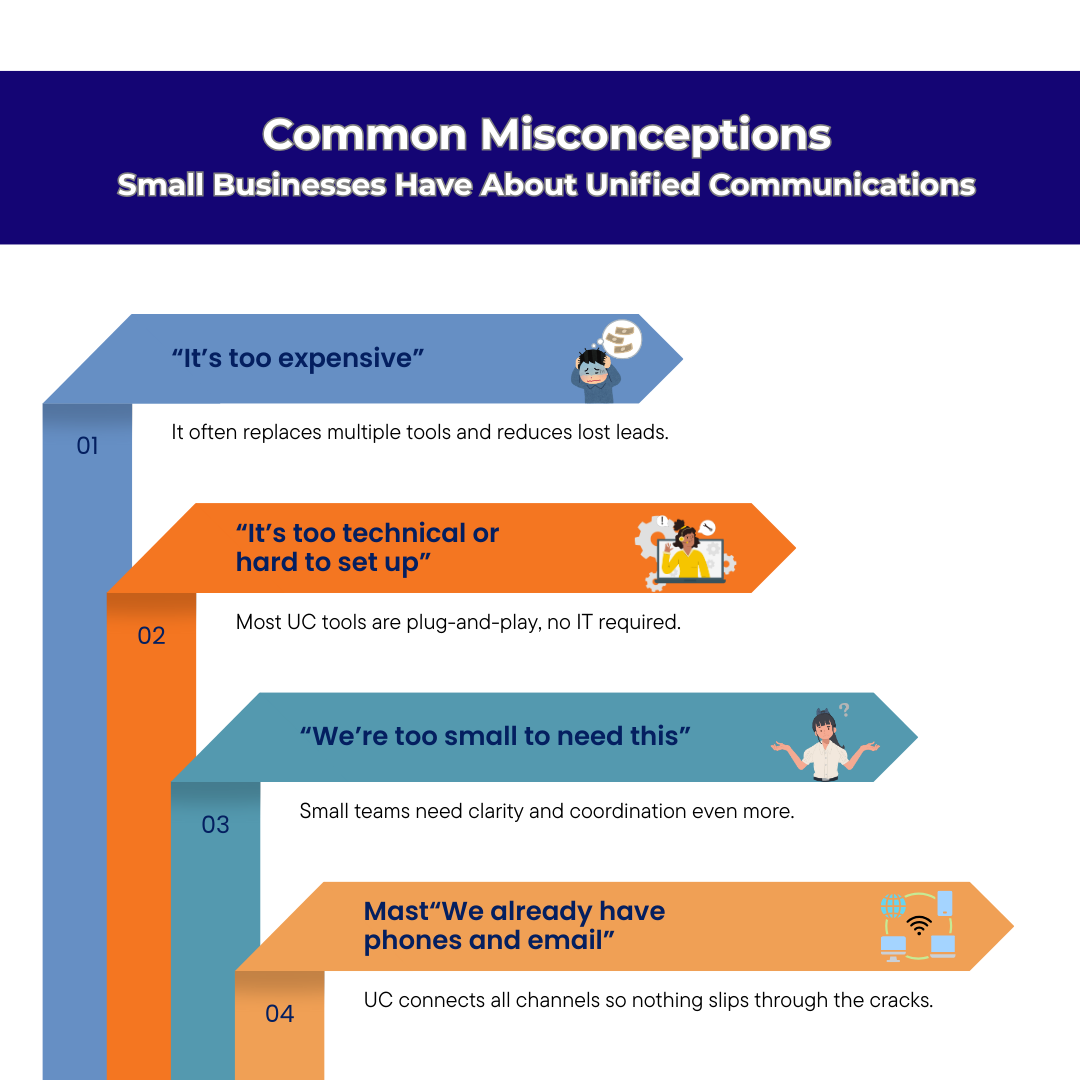
Why many teams avoid it—and why they don’t need to.
Despite the benefits, many small businesses hesitate to adopt unified communications. And it’s not because they don’t see the problem—it’s because they misunderstand the solution.
Let’s break down a few of the most common misconceptions that hold small teams back.
“It’s too expensive”
When people hear the phrase “unified communications,” they picture enterprise platforms with five-figure contracts and features they’ll never use. But in reality, small-business-ready systems are more affordable than ever. In many cases, they replace the cost of multiple tools you’re already paying for—and eliminate the cost of dropped leads or poor response times.
The right platform isn’t a cost center—it’s an efficiency multiplier.
“It’s too technical or hard to set up”
Small teams don’t have an IT department or the luxury of time to rewire their workflows. And they shouldn’t have to. Modern UC tools are built to be plug-and-play. If you can log into email and send a text, you can use a unified system. No complicated onboarding. No training manuals. Just a better way to manage your existing communication.
“We’re too small to need this”
If you’re managing customer communication across multiple channels—even with just two or three people—you’re already outgrowing patchwork tools. The smaller the team, the more important visibility and coordination become. Unified communications isn’t about being big. It’s about staying in control while you’re small.
“We already have phones and email—what’s the point?”
Phones and email alone aren’t enough anymore. Customers text. They chat. They message on Facebook and ask for callbacks. They expect a fast, seamless experience—and if your team is switching between apps and forwarding emails just to keep up, you’re already behind.
UC isn’t about replacing phones or email. It’s about connecting everything behind the scenes so your team isn’t working in silos. It makes the channels you already use more effective.
By understanding what unified communications actually offers—and what it doesn’t require—small businesses can make smarter choices without fear, bloat, or overkill.
Real-World Scenarios Where Unified Communications Makes a Difference
What this looks like in practice—not in theory.
Unified communications sounds nice in concept, but the real value shows up in everyday situations where time, clarity, and responsiveness matter. These aren’t enterprise case studies. They’re real scenarios small teams face every day—where a connected communication system turns chaos into control.
Scenario 1: The 3-Person HVAC Company
This local HVAC team handles service calls, emergency dispatch, and appointment scheduling—all while on the move.
Before unified communications:
- Customers left voicemails that went unchecked until the end of the day
- Texts were sent from personal phones, with no message history or visibility
- Missed appointments and overlapping responses became common
After implementing a unified system:
- All calls and texts route through a single business number accessible on any device
- Each technician is assigned incoming messages in real-time
- Job confirmations and updates are sent via text from a shared inbox, ensuring consistency
- Missed calls trigger automatic follow-ups, cutting no-shows in half
Scenario 2: The Dental Office with Limited Front Desk Staff
This dental clinic had two team members managing reception, scheduling, and patient follow-ups—while also handling walk-ins and insurance paperwork.
Their challenge: They were receiving a mix of phone calls, email appointment requests, and last-minute texts from patients asking to reschedule—all with no centralized view.
With a unified system in place:
- All communications (SMS, calls, voicemails) are visible in one platform
- Internal notes help front desk staff document each patient’s preferences
- Automated reminders are scheduled via SMS
- Missed calls during lunch hours now trigger quick text replies with rescheduling options
This improved not just workflow—it improved patient satisfaction and drastically reduced call-backs.
Scenario 3: The Independent Retail Shop with Online Orders
This boutique sells both in-store and online. The owner and one assistant manage inventory, customer support, and local pickup logistics.
Before UC:
- Order updates were emailed manually
- Pickup confirmations came in via Instagram DMs and got overlooked
- Customer questions came in via email and phone, and often got delayed because the team was on the shop floor
After:
- Order and pickup updates are sent via SMS
- Customers can text for updates instead of calling, freeing up the phone line
- All conversations—from pre-purchase questions to post-purchase support—are stored in one timeline, making it easier to track issues and serve repeat customers
These examples aren’t edge cases—they’re everyday situations where small teams are expected to deliver fast, professional communication with limited time and headcount. Unified communications doesn’t remove the work. It just removes the noise.
What to Look for in a Small Business UC Tool
The right solution keeps things simple, not overwhelming.
Choosing a unified communications (UC) tool isn’t about ticking boxes—it’s about finding a platform that matches how small teams actually work. You don’t need enterprise bells and whistles. You need speed, clarity, and affordability.
Here’s what truly matters when evaluating a UC platform for your business:
Simple Setup and Onboarding
You shouldn’t need an IT department to get started. The right tool should let you:
- Pick a local or toll-free number
- Start texting and calling within minutes
- Add team members without jumping through hoops
- Import contacts or forward calls with a few clicks
A clean interface and intuitive onboarding process mean you can train your staff in under 15 minutes—not waste hours figuring out a maze of dashboards.
SMS + Voice in One System
You need a system that keeps both messages and calls in the same place—under one thread, per contact. This eliminates confusion, speeds up responses, and helps your team avoid sending conflicting replies. For a deeper comparison of calling and messaging in customer communication, Business Texting vs Phone Calls: How to Use Both Effectively outlines when each channel works best.
With a combined SMS + VoIP setup:
- You can call or text from the same business number
- Voicemails, missed calls, and texts all land in the same inbox
- Your team can reply instantly, from desktop or mobile
This is especially important when you’re balancing customer support, appointment reminders, and follow-ups all from the same line.
Shared Team Access
When multiple team members communicate with customers, visibility is everything.
Look for a platform that gives your whole team access to a shared inbox. Everyone should be able to see:
- Ongoing conversations
- Who last replied
- What’s been resolved
- What needs attention
No more guessing who handled what. This transparency prevents double replies and ensures nothing slips through the cracks—especially during handoffs or shift changes.
Searchable Conversation History
Customers expect you to remember the last conversation—even if it happened weeks ago.
You need a system that stores all past messages, calls, and voicemails in one searchable timeline. This lets you:
- Quickly reference past issues
- See how often someone has contacted you
- Keep a pulse on common questions or problems
It’s also a critical piece of quality control. Managers can spot gaps in communication, review message tone, and step in where needed.
Affordability and Flexibility
Most UC platforms are priced for enterprises. You shouldn’t have to pay $60/user/month to simply manage texts and calls.
Look for a provider that offers:
- Flat, transparent pricing
- No long-term contracts
- Per-user or per-number flexibility
- Support included—without extra fees
Your UC tool should grow with you—not lock you into features you don’t need. Whether you’re solo today or scaling to five reps next quarter, the pricing model should support that growth.
TMMN was built around these exact principles.
From simple onboarding to shared access and clean interface, it gives small teams the clarity they need—without bloated pricing or complexity.
The Future of Small Business Communication
Small business communication is changing fast—but not in the way many people fear. The future isn’t about replacing humans with machines or forcing businesses into complex enterprise systems. It’s about removing friction, speeding up response, and making communication feel effortless for both customers and teams.
Customers Expect Instant, Seamless Communication
In 2026, customers don’t compare you to businesses in your industry. Research from PwC shows that customer experience is now one of the top factors influencing buying decisions, reinforcing why fast, connected communication matters.They compare you to the best experience they’ve had anywhere.
They expect:
- Quick responses, even if the final answer comes later
- Continuity when they switch from text to call or follow up days later
- Clear, consistent communication without repeating themselves
If communication feels slow, disjointed, or confusing, customers don’t assume you’re busy. They assume you’re disorganized. And they move on.
This is why small businesses can’t rely on single-channel tools anymore. Seamless communication isn’t about being everywhere—it’s about being reliable and responsive where it matters most.
AI and Automation Will Support—Not Replace—Humans
There’s a lot of noise around AI replacing customer support. That’s not the reality for small businesses.
What is happening is quieter—and far more useful.
AI and automation are being used to:
- Handle repetitive tasks like confirmations and acknowledgements
- Surface conversations that need urgent attention
- Reduce manual typing with smart templates and suggestions
- Keep communication organized behind the scenes
The human remains at the center. Automation simply removes the busywork that slows teams down and drains energy. The future belongs to businesses that use technology to support people, not replace them.
Why Choosing the Right Platform Now Future‑Proofs Your Business
The tools you choose today determine how painful—or smooth—growth will be tomorrow.
A platform built with clarity, shared visibility, and flexibility at its core allows you to:
- Add team members without breaking workflows
- Expand communication channels without losing control
- Adapt to new customer expectations without rebuilding everything
Choosing the right foundation now means you don’t have to keep switching tools every year. You evolve instead of restart.
That’s the direction Text My Main Number is built around.
Our roadmap is focused on helping small businesses move toward more connected, streamlined communication—without complexity, jargon, or enterprise bloat. Every update is designed to solve real problems small teams face daily, not to chase buzzwords.
Try Text My Main Number Free for 14 Days
You don’t need complex software or a big team to modernize your communication. You just need a tool that helps your existing team stay organized, respond faster, and deliver a better customer experience—every single day.
Text My Main Number was built for small businesses that want to keep it simple without falling behind. It combines business texting, VoIP features, and team collaboration into one clean interface—no steep learning curve, no bloated enterprise pricing.
And we’re not stopping there.
We’re actively building toward a future where Text My Main Number becomes a full multichannel platform. That means adding more communication tools—like live chat, email routing, CRM Integration and social messaging—so your team can manage all customer interactions in one place. Our goal is to make true unified communications accessible for small businesses without the overwhelm.
Every feature we roll out is grounded in a simple belief: the best tools support your workflow, not replace it.
Start your 14-day free trial today—no credit card required—and experience a calmer, more connected way to manage conversations.

.svg)